Choosing an ELM327 adapter that works with your car
SC OBD2 needs an Android phone, a vehicle that provides compatible OBD data and an adapter suited to the vehicle and connection type. The adapter is the link between the diagnostic socket and your phone. Check these three parts together before comparing app features.
SC OBD2 Legacy is the Android app currently available. SCA Runtime is a new, unreleased architecture; it does not add connection options to this app.
An OBD2 scanner: how the parts work together
You need three parts: a compatible car, an OBD2 adapter and an Android phone with the app. The adapter is the physical device connected to the diagnostic socket; Smart Control OBD2 is the software that displays the received data. The app does not include an adapter, and the phone alone cannot read the car’s socket.
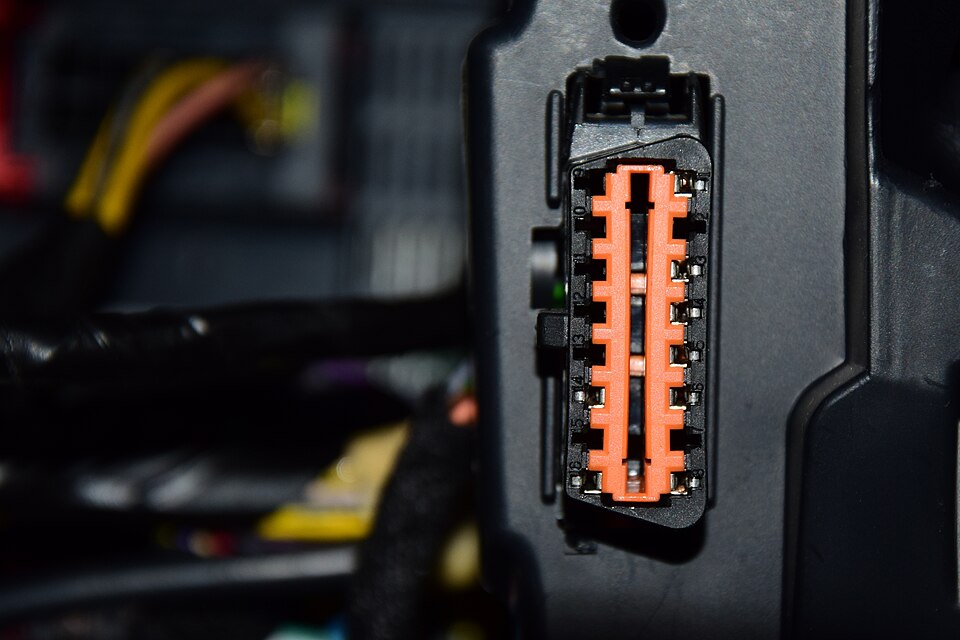
The OBD2 socket is a diagnostic connector with 16 positions, often under the dashboard. Its exact location depends on the vehicle: check the handbook. Connect and set up the adapter while the vehicle is stationary, following the manufacturer’s instructions, without forcing the connector.
The car does not need its own Internet connection: diagnostic data travels from the vehicle to the adapter and then to the phone. An older car may also be suitable if it is compatible. Below you can check the connections supported by the app and what to verify before choosing an adapter.
Adapters sold under similar names can differ in their interface, supported commands and communication quality. Check the precise model, the manufacturer’s instructions and support for your vehicle’s protocol. An ELM327 label, or a successful connection in another app, is not enough to establish compatibility with SC OBD2.
Check how the adapter communicates with Android as well: which Bluetooth device to select, or which Wi-Fi network and connection settings the manufacturer specifies. Connecting the phone to the adapter and getting a response from the vehicle are separate steps. The phone may see an adapter before the vehicle has answered any diagnostic request.
Start with the free readings to check your own combination of car, phone and adapter. Full adds the supported software functions; it cannot make an incompatible adapter work or create readings the vehicle does not provide.
Find the stage at which the connection stops
While parked, locate the diagnostic socket using the vehicle handbook, connect the adapter and check that it has power. Follow the guide for your installed app version to select the right device or network and grant the Android permissions actually requested. Avoid having another app or phone use the same adapter at the same time.
If the phone cannot see the adapter, start with power and the wireless connection. If it sees the adapter but the app cannot open a session, check the selected device and connection settings. If the adapter responds but vehicle readings do not arrive, check the manufacturer’s ignition and engine conditions, protocol support and any error message. Work through the stages rather than changing settings at random.
When asking for help, keep the adapter model, connection type, Android and app versions, and the exact message. Passwords, VINs and personal addresses are not needed. Do not erase vehicle profiles or trip history just to repeat a normal connection attempt.
1. Compatible with SC OBD2 today
Legacy supports only these two transports:
Bluetooth Classic / SPPWi-Fi · TCP/IP
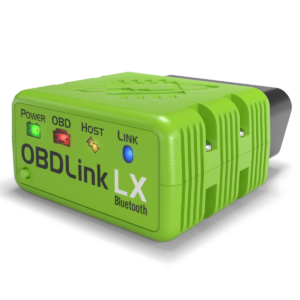
The models below have specific Legacy evidence over Bluetooth Classic. “Bench” describes the test context: it is not a universal compatibility promise or certification of every function.
TESTED WITH SC OBD2 LEGACY · BENCH
OBDLink LX
Bluetooth Classic / SPP
Hardware variant considered
OBDLink LX · Bluetooth Classic / SPP. Tests concern project specimens; they do not qualify every hardware or firmware revision.
Available Legacy evidence
SC OBD2 Legacy on Android, direct LX–OBD simulator connection: live parameters and a DTC read with no codes found. Not a real-vehicle test.
Use with the app available today
Use the Bluetooth Classic/SPP mode described here. Accessible data and functions also depend on the vehicle and control unit.
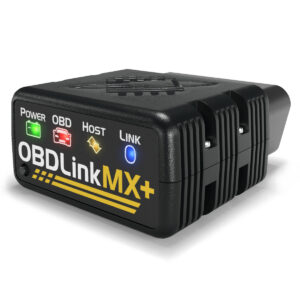
OBDLink MX+ · Bluetooth Classic / SPP. Tests concern project specimens; they do not qualify every hardware or firmware revision.
Available Legacy evidence
SC OBD2 Legacy on Android, Bluetooth Classic to MX+ on a bench/simulator: live-reading session and disconnect/reconnect checks. Not certification for all vehicles.
Use with the app available today
Use the Bluetooth Classic/SPP mode described here. Accessible data and functions also depend on the vehicle and control unit.
Wi-Fi / TCP-IP — It is a supported SC OBD2 Legacy transport. However, no Wi-Fi model receives a compatibility badge without evidence for that exact model and hardware variant. A TCP simulator test does not certify a commercial Wi-Fi adapter.
Brand alone is insufficient: LX or MX+ evidence is not extended to other OBDLink devices or undocumented vLinker variants. Exact model, transport, revision and configuration matter.
The new architecture plans Bluetooth Classic, Wi-Fi/TCP-IP, BLE and USB support. This is planned support, not a capability of the version downloadable today. No availability date is announced.
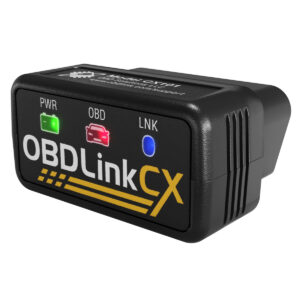
OBDLink CX · Bluetooth Low Energy (BLE). Example hardware for future integration.
Support status
Support planned in the new architecture. No complete internal qualification of this model is asserted here: SCA Runtime tests, even when successful, are not equivalent to a public release.
Use with the app available today
Not usable with current SC OBD2 Legacy. Do not purchase it to connect to the currently downloadable version.
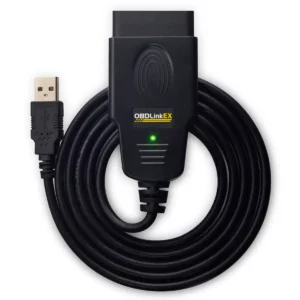
OBDLink EX · USB. Example hardware for future integration.
Support status
Support planned in the new architecture. No complete internal qualification of this model is asserted here: SCA Runtime tests, even when successful, are not equivalent to a public release.
Use with the app available today
Not usable with current SC OBD2 Legacy. Do not purchase it to connect to the currently downloadable version.
Planned support, internal tests and public availability are three different states. A successful Runtime test does not justify a “compatible today” label for SC OBD2 Legacy. Future multi-transport models will list each mode and its status separately.
Check the configuration before choosing.
Check vehicle OBD2/EOBD support, exact adapter model and variant, transport and app version. Do not purchase Runtime hardware for use with current Legacy. Features advertised for manufacturer apps are not automatically available in SmartControl.
Recognising the socket. Colour and orientation may differ. Use your manual and the orientation diagram to locate it in your car, not its position in this photo.0x010C / Wikimedia Commons · CC BY-SA 4.0 · Resized, not retouched
Product photographs: OBD Solutions / OBDLink, from the linked official product pages. Trademarks and images belong to their owners; no partnership or endorsement implied.
What to observe before drawing conclusions
Keep the exact code and any status shown, the symptoms, and the circumstances in which they appeared. If live readings are available, note their names, values and units. Missing information is not zero and a reading does not by itself confirm a cause.
Smart Control OBD2 reads available codes and parameters through a compatible adapter. It helps you observe and retain context; it does not automatically identify the cause of a fault. Coverage depends on the vehicle, control unit and adapter.